How to Convert Photos of Events into Calendar Entries Automatically
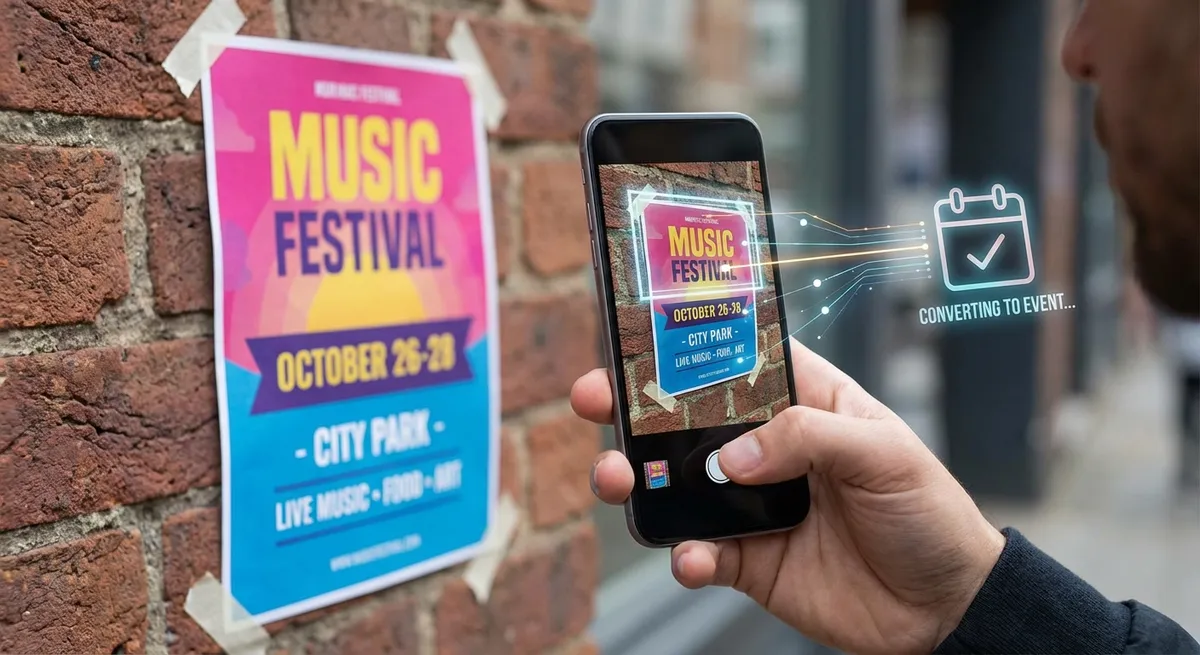
Think about the last week. How many times did you take a photo of something that included event information? A birthday party invitation pinned to a board. A screenshot of a restaurant reservation confirmation. A photo of a conference schedule taped to a wall. A friend's text message with party details.
Now think about how many of those events actually made it into your calendar. If you're like most people, the answer is "not all of them."Converting photos to calendar events used to require you to manually read the image and type everything in. But with AI, that's history.
The Problem: Photos Full of Events, Empty Calendars
Our phones have become our default note-taking tool. We photograph everything — schedules, invitations, flyers, confirmations. But photos are passive data. They sit in your camera roll doing nothing until you manually extract the information.
Research shows the average smartphone user takes over 2,000 photos per year. Many of these contain actionable scheduling information that never gets transferred to a calendar. The result? Missed events, double bookings, and the frustrating feeling that your digital life is disorganized.
The Solution: AI-Powered Photo-to-Calendar Conversion
Modern AI can look at a photo and understand what it sees — not just as pixels, but as meaningful information. When you point AI at an event photo, it can identify:
- What the event is (title, description, type)
- When it happens (date, start time, end time, timezone)
- Where it takes place (venue name, street address, city)
- Extra details like ticket prices, dress codes, contact info, or RSVP deadlines
This is the core technology behind Photo2Calendar — an app that turns any photo into a structured, saveable calendar event.
Try Photo2Calendar free on iOS or Android.
How to Convert a Photo to a Calendar Event
Method 1: Snap a New Photo
The quickest method when you're standing in front of an event poster, flyer, or schedule:
- Open Photo2Calendar and tap the camera button
- Frame the event information in your viewfinder
- Take the photo — the AI begins processing immediately
- Review the extracted event details
- Tap Save to Calendar
Total time: about 5 seconds from photo to saved event.
Method 2: Import from Gallery
Already have photos with event information sitting in your camera roll? You can import them:
- Open Photo2Calendar and tap the gallery icon
- Browse or search your photos
- Select one or multiple images
- The AI processes each image and extracts event details
- Review and save each event
This is perfect for catching up on events you photographed earlier but never added to your calendar.
Method 3: Share from Other Apps
See an event on Instagram, WhatsApp, or a website? Use your phone's share function:
- Take a screenshot or share the image
- Select Photo2Calendar from the share sheet
- The app processes the image and presents extracted details
- Save to your calendar
What Types of Photos Work Best?
Printed Materials
Event flyers, concert posters, theater programs, restaurant menus with event nights, church bulletins, community center schedules — any printed material with event details.
Digital Screens
Screenshots of event pages on Facebook, Eventbrite, Meetup. Screenshots of email confirmations. Photos of digital signage in public places.
Handwritten Notes
Written meeting notes, personal scheduling notes, handwritten invitations. Photo2Calendar's AI handles handwriting recognition too — see our handwritten notes guide for more.
Tickets & Confirmations
Concert tickets (physical and digital), airline boarding passes, hotel reservations, appointment confirmations. Read more in our concert ticket scanning guide and PDF tickets guide.
Pro Tips for Better Conversion Results
Lighting and Clarity
The clearer the text in your photo, the better the AI can read it. Well-lit, focused images produce the most accurate results. Avoid shooting at steep angles that distort text.
Include All Relevant Information
Make sure the photo captures the complete event information — title, date, time, and location. If details are spread across multiple parts of a flyer, you might need to take multiple photos or a wider shot.
Crop Out Noise
If there's a lot of non-event text surrounding the event details (advertisements, unrelated content), crop the image to focus on the relevant information before importing.
Real-World Example
Let's say you walk past a poster for a local jazz festival. The poster shows:
Summer Jazz Festival 2025
June 14-15, 2025 | 6:00 PM – 11:00 PM
Central Park Bandshell, New York
Free Admission | food trucks on site
You snap a photo with Photo2Calendar. In under 5 seconds, the app creates a calendar event with:
- Title: Summer Jazz Festival 2025
- Date: June 14, 2025
- Time: 6:00 PM – 11:00 PM
- Location: Central Park Bandshell, New York
- Notes: Free Admission, food trucks on site
One tap to save. Done. No typing, no mistakes, no forgotten events.
Beyond Photos: Text, Voice, and More
Photo conversion is just one of Photo2Calendar's input methods. You can also:
- Paste text from emails or messages and let the AI parse event details automatically
- Use voice input to dictate events hands-free — see our voice-to-calendar guide
- Import PDFs of tickets and itineraries for automatic extraction
For a complete overview of calendar management strategies, check out our Ultimate Calendar Management Guide.
Why Photo2Calendar Stands Out
With over 10,000 downloads and a 4.8★ rating, Photo2Calendar has earned recognition from publications like Computer Active UK and coverage by HowToMen on YouTube. What sets it apart:
- Multi-language support: Available in English, Italian, and German with more languages coming
- Multi-input: Photos, text, voice, handwriting, PDFs — not just photos
- Universal calendar sync: Works with Google Calendar, Apple Calendar, Outlook, and any CalDAV calendar
- Privacy first: Images are processed securely and not stored on servers
Start Converting Photos to Calendar Events
Every photo with event information is a potential missed appointment. Stop relying on memory and start using AI to bridge the gap between your camera roll and your calendar.
Download Photo2Calendar free on iOS or Android and convert your first photo today. It takes less time than reading this sentence.